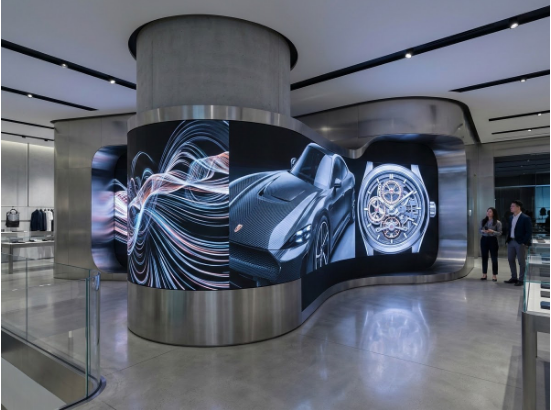

A curved display should earn its place in a store. It may help visitors notice an entrance, follow a product story around a column, or understand a demonstration from a designated viewing area. Before choosing a shape, decide what the display needs to communicate and where people will see it. That brief gives designers a useful starting point for a flexible LED screen.
Retail teams often begin with a striking animation or a reference image. A better first meeting brings together the store layout, content plan, and service requirements. The following approach helps turn a visual concept into a display that can support everyday operations.
Give the Screen a Clear Role in the Customer Journey
Walk through the space as a visitor would. Record the entrance view, the route toward key products, and the places where people pause. Ask what information belongs at each point. A screen beside a demonstration area might explain one feature, while a display around a column might repeat a short campaign message for people approaching from different directions.
Choose a primary role before adding secondary uses. Trying to combine detailed product comparisons, ambient animation, and directional information in one short loop can make the message difficult to follow. Agree on the main task and create a content schedule around it.
For example, a showroom team could reserve demonstration hours for product footage and use quieter periods for brand visuals. Assign a member of staff to keep that schedule aligned with the demonstrations taking place each day.
Match the Curve to the Space and the Message
A flexible LED display can be considered when a project calls for a shaped surface, but the intended geometry still needs approval for the selected module and support structure. Ask the supplier to evaluate the actual drawing rather than approving a shape from a photograph alone.
For a column installation, mark which faces are visible from each approach. Place important words within those visible areas. A visitor standing on one side cannot read a headline that continues around the back. Repeating a complete short message in separate zones may work better than stretching one sentence across the circumference.
For a curved feature wall, identify the principal viewing position and test the composition from there. Then check the side approaches. Keep product names and essential information in areas where the intended audience can comfortably see them.
Choose Pixel Pitch With Real Content
Pixel pitch describes the distance between neighboring pixel centers. A smaller pitch generally supports closer viewing, but an acceptable result also depends on the content and the viewer. Avoid treating a simple distance rule as a final specification.
Prepare a test playlist with the material the store will actually use. Include product labels, a close-up image, a moving sequence, and the smallest text planned for the campaign. Review it from the closest expected position and the main stopping point. Request a demonstration before approving the configuration if the result is uncertain.
The design brief for a flexible LED screen should describe these viewing positions and content requirements. This gives the supplier more useful information than a request for the finest available pitch.
Prepare Artwork for the Final Screen Canvas
Ask for the approved pixel dimensions and a layout showing where the content appears on the finished surface. Give that layout to the creative team before final animation begins. Include the position of the visible joining area on a wrapped display and any portions hidden by surrounding architecture.
Use a rough preview to check message placement, then test the actual media on the installation. A flat preview alone cannot tell the team whether a logo is easy to recognize from a side approach. Review the sequence while walking through the same route visitors will take.
Keep an editable master file for each campaign. When a message needs to move or a product name changes, the operator should be able to update the content without rebuilding the entire project.
Make Maintenance Part of the Design Review
Before enclosing a bendable LED screen within decorative finishes, ask the installer to show how a module will be removed and how the required components will be reached. Have the store team review that procedure alongside the visual design.
Agree on a service schedule, replacement responsibilities, and the location of the operating instructions. Arrange a handover session that covers starting playback, changing a playlist, reporting a fault, and restoring approved settings. A display that staff can operate confidently is more useful than a complicated installation with no clear owner.
Approve the Experience Before Opening
Use the final walkthrough to check the screen as part of the store. Confirm that messages are readable from the agreed positions, the content suits its role, and the service procedure remains possible after surrounding finishes are complete.
Then assign someone to review the playlist as products and campaigns change. The physical curve may stay the same for years, but its value depends on a content plan that continues to match the showroom and its visitors.