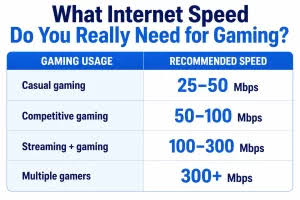

Internet providers advertise one number, download speed, in the biggest font they can find. For streaming video, that number matters. For online gaming, it’s almost irrelevant. A gamer on a modest connection with low, stable latency will have a far better experience than one on a gigabit plan that stutters. Here’s how to choose a connection for play, not for marketing.
The three numbers that matter
Latency, or ping, is the round-trip time between you and a slot88 server, in milliseconds. This is the one that decides whether a game feels responsive. Under 30ms is excellent. Under 60 is good. Above 100, you’ll notice. Latency is mostly determined by your connection type and your distance from the server, and no amount of extra speed reduces it.
Jitter is how much your latency varies. A connection that alternates between 20ms and 80ms is worse for gaming than one that sits steadily at 50, because games predict where things will be based on a consistent delay, and variation breaks the prediction. Jitter shows up as stutter and rubber-banding.
Packet loss is the percentage of data that never arrives. Even one percent is noticeable in a fast game: shots that don’t register, players who teleport. Zero is the target, and anything above 0.5 percent is a problem worth fixing.
Bandwidth, the advertised speed, matters only up to a point. Most online games use under 1 Mbps in play. Downloads and updates use more, and if other people in the house stream video while you play, you need enough headroom that their traffic doesn’t crowd yours. 25 to 50 Mbps covers a typical household. Beyond that, extra speed buys shorter downloads and nothing else.
Connection types, ranked for gaming
Fibre to the home is the best option where it exists. Latency is low, jitter is minimal, and speeds are symmetrical, which matters for streaming your own play. If fibre is available, take it even at a lower speed tier than cable offers.
Cable is fine for most people. Latency is slightly higher than fibre and can rise in the evening when the neighbourhood is busy, because cable segments are shared. Upload speeds are usually much lower than download, which affects streamers more than players.
DSL over phone lines is usable but ageing. Latency is acceptable, speeds are limited, and quality depends heavily on distance from the exchange. Good enough for most games if the line is stable.
5G home internet and fixed wireless have improved a lot but remain variable. Latency can be low when signal is strong and terrible when it isn’t, and jitter is typically higher than wired options. Workable, but check reviews from gamers in your area before committing.
Satellite has traditionally been the worst option, because the signal travels to orbit and back. Newer low-earth-orbit services have cut latency dramatically, from over 600ms to somewhere in the 30 to 60ms range, and are now genuinely playable, though jitter and occasional drops remain more common than on a wire.
Mobile data on a phone is fine for mobile games designed around it. For anything more demanding, treat it as a last resort.
Questions to ask a provider
Ask about latency and whether they have peering with major cloud providers, because game servers live on AWS, Google Cloud and Azure. A provider with good routes to those networks will give you lower pings than one that sends your traffic the long way round.
Ask whether the connection is shared and what happens at peak times.
Ask about data caps. Modern games are 50 to 150GB to download and receive frequent large updates. A capped plan can be exhausted by a couple of new games in a month.
And ask other gamers locally. Forums and community groups often know which provider in a given area has the clean routing and which one drops packets every evening.
The settings that help
Once you have a connection, most slot gacor problems come from inside the house.
Use a cable. Wi-Fi adds latency and jitter no matter how good the router. If a cable is impossible, powerline adapters or a mesh system with a wired backhaul are the next best thing.
Enable Quality of Service on your router if it has it, and give your gaming device priority. This stops a family member’s video call from causing your lag spike.
Update the router’s firmware. Old firmware is a common, invisible cause of dropped connections.
Choose the nearest server region in every game’s settings. Auto-select usually gets this right but not always.
And test. Free tools measure latency, jitter and packet loss to real servers. Run one at a quiet time and at a busy one and compare. If the busy-time numbers are bad, the problem is congestion, and that’s a conversation to have with your provider or a reason to switch.
The short version
Choose wired fibre if you can, cable if you can’t, and a plan of at least 25 Mbps with no data cap. Then run an ethernet cable to your device. Those two decisions do more for online gaming than any amount of speed, and they’re the ones the advertising won’t tell you about.